 Back to home
case study
Expediate: food logging for athletes
 Live App
 GitHub (UI)
Expediate aims to make food logging easier for athletes following the Diet Quality Score model.

Overview & Problem
Expediate aims to make logging food simple. Athletes provide a comma-separated list of the food they ate, and the system parses it and provides a Diet Quality Score (DQS).
The goal of this project was to deliver a MVP wherein athletes could log data in a simple way and receive a basic DQS-informed summary. While features such as user accounts, detailed breakdowns and integration with other scoring systems would be useful, these were out-of-scope for the MVP.
Expediate supports a chaotic and sloppy list of food intake, providing the user with useful scoring data.
The key engineering challenge was making DQS reliable from such messy
natural-language logs. Logs include mixed objective/subjective units (tbsp, handful, etc) and descriptive adjectives (large, semi-skimmed, etc).
For example, the system accepts inputs such as:
1 portion oats, 250ml semi-skimmed milk, large banana, handful raisins, 1 tbsp peanut butter, bunch of crisps ...If parsing is inconsistent or the portion maths is wrong, the computed score is not useful.
What is DQS?
Diet Quality Score (DQS) is a rule-of-thumb system introduced by Matt Fitzgerald to help athletes measure diet quality without tracking every calorie.
Fitzgerald's DQS is point-based and depends on two factors:
- The quality of the food type (e.g. fruits vs sweets).
- The quantity pattern (how many servings of that food type appear in the log).
The scoring table maps each food type/category to points based on its 1st through 6th+ serving in the log (serving count derived from parsed units/portions):
| Food Type | 1st | 2nd | 3rd | 4th | 5th | 6th |
|---|---|---|---|---|---|---|
| Fruits | 2 | 2 | 2 | 1 | 0 | 0 |
| Vegetables | 2 | 2 | 2 | 1 | 0 | 0 |
| Lean meats & fish | 2 | 2 | 1 | 0 | 0 | -1 |
| Nuts & seeds | 2 | 2 | 1 | 0 | 0 | -1 |
| Whole grains | 2 | 2 | 1 | 0 | 0 | -1 |
| Dairy | 1 | 1 | 1 | 0 | -1 | -2 |
| Refined grains | -1 | -1 | -2 | -2 | -2 | -2 |
| Sweets | -2 | -2 | -2 | -2 | -2 | -2 |
| Fried foods | -2 | -2 | -2 | -2 | -2 | -2 |
| Fatty proteins | -1 | -1 | -2 | -2 | -2 | -2 |
In this project, that table becomes CategoryScores, and the API computes DQS by counting servings per category and mapping
count and converting those into points.
The Challenge
Because DQS is the primary output, the implementation has to:
- Produce an explainable breakdown (per category + per logged item).
- Normalise inputs consistently (units, plurals/singulars, variants).
- Keep portion maths stable so the same log format yields predictable scoring.
MVP Goals
- Accept simple, messy log input.
- Convert the log into meaningful data (i.e. foods, categories, servings).
- Produce meaningful DQS outputs with unit-tested deterministic logic.
- Iterate quickly on the parts that most affect score reliability (e.g. parsing, categorisation and portion maths).
Design (Figma)
Expediate was designed from scratch in Figma.
I focused on:
- A simple user interface with minimal distraction, providing a clean interface to submit food logs.
-
A results layout that showcases the
DQSinitially, then expands into per-category and per-item scoring. - Making parsing outcomes visible enough that users understand what the system interpreted (normalised food, units, quantities).

Figma wireframe of log input and results.
System Architecture
The main architectural goal was separation of concerns and maintainability.
The data logged by the user on the client flows through several stages on the backend (as outlined below), which are intentionally modular.
The API is orchestrated in a clear sequence:
- Transformer: log text →
{ food, quantity, unit, unitType } - Categoriser: categorised food based on DQS categories →
FoodCategory - Scorer: category logs →
totalScore+ per-category breakdown
The main driver for this is that in the future, it may be desirable to add other scoring methods (e.g. Nutri-Score or NOVA).
Such scoring systems would require an alternative implementation of the scorer, whereas the transformer and categoriser may potentially remain the same.
Similarly, with our modular approach, parsing/categorisation improvements don't require changes to the scoring stage.
Orchestration boundary
Pipeline orchestrator: splits the input, parses each item, categorises it, and delegates scoring.
// expediate-api/src/log/log.service.ts
@Injectable()
export class LogService {
  constructor(
    // These services can be easily swapped out
    private transformerService: TransformerService,
    private categoriserService: CategoriserService,
    private scorerService: ScorerService,
  ) {}

  create({ log }: LogDto) {
    const mappedLog = log
      .split(",")
      .map(this.transformerService.parse)
      .map((log) => ({
        category: this.categoriserService.categorise(log.food),
        ...log,
      }));

    return this.scorerService.score(mappedLog);
  }
}
Interfaces for evolution
Categoriser plugin boundary: map a normalised food string to a FoodCategory.
// expediate-api/src/categoriser/categoriser.interface.ts
export interface CategoriserInterface {
  categorise(food: string): FoodCategory;
}
Scoring plugin boundary: compute total DQS and per-category breakdown from scored log items.
// expediate-api/src/scorer/scorer.interface.ts
export interface ScorerInterface {
  score(log: Array<LogItem>): ScoredResults;
}
Key Engineering Decisions
A) Portion accuracy: base conversions and overrides to make scoring consistent
Problem: the portion maths had to be stable across objective
units (g, ml, etc.) and subjective units (portion, piece, scoop, etc.).
Approach: layered mappings:
-
UnitMapconverts objective units to grams. -
CategoryToGramsMapdefines “grams per serving” perFoodCategory. -
FoodToGramsMapoverrides grams-per-portion for specific foods that don't fit the generic serving assumption. -
SubjectiveUnitToGramsCategoryMapdefines grams-per-subjective-unit per category. - A deterministic serving calculation always rounds up (simple + predictable behavior)
Base serving model: convert objective units to grams and define grams-per-category serving.
// expediate-api/src/transformer/units.map.ts
export const UnitMap: Record<string, number> = {
  g: 1,
  kg: 1000,
  lb: 454,
};

export const CategoryToGramsMap: Record<FoodCategory, number> = {
  fruit: 100,
  vegetables: 100,
  "lean-meat-and-fish": 80,
  "nuts-seeds": 30,
  "whole-grains": 50,
  dairy: 40,
  "refined-grains": 50,
  sweets: 50,
  "fried-foods": 50,
  "fatty-proteins": 80,
  unknown: 50,
};
Food-specific overrides for known mismatches (e.g., foods that don't behave like generic serving sizes).
export const FoodToGramsMap: Record<string, number> = {
  sausage: CategoryToGramsMap["fatty-proteins"] / 2,
  sausages: CategoryToGramsMap["fatty-proteins"] / 2,
  potato: 50,
  potatoes: 50,
  biscuit: CategoryToGramsMap["sweets"] / 2,
  biscuits: CategoryToGramsMap["sweets"] / 2,
};
Servings calculation: map a logged quantity to grams and round up to the next serving.
// expediate-api/src/scorer/scorer.service.ts
calculateTotalServings = (food: string, quantity: number, category: FoodCategory, unit?: Unit) => {
  const unitInGrams = this.convertUnitToGrams(
    food,
    unit || "serving",
    category,
    quantity,
  );

  // Always round UP to the nearest serving.
  return Math.ceil(unitInGrams / CategoryToGramsMap[category]) || 1;
};

convertUnitToGrams = (food: string, unit: Unit, category: FoodCategory, quantity: number) => {
  let unitMappedToGrams = 1;

  if (isObjectiveUnit(unit)) {
    unitMappedToGrams = UnitMap[unit];
  } else {
    unitMappedToGrams =
      FoodToGramsMap[food] ||
      SubjectiveUnitToGramsCategoryMap[category][unit] ||
      SubjectiveUnitFallbackCategoryMap[category];
  }

  return unitMappedToGrams * quantity;
};
Screenshot suggestion: show raw input like 4 biscuits and the
derived “servings” calculation.
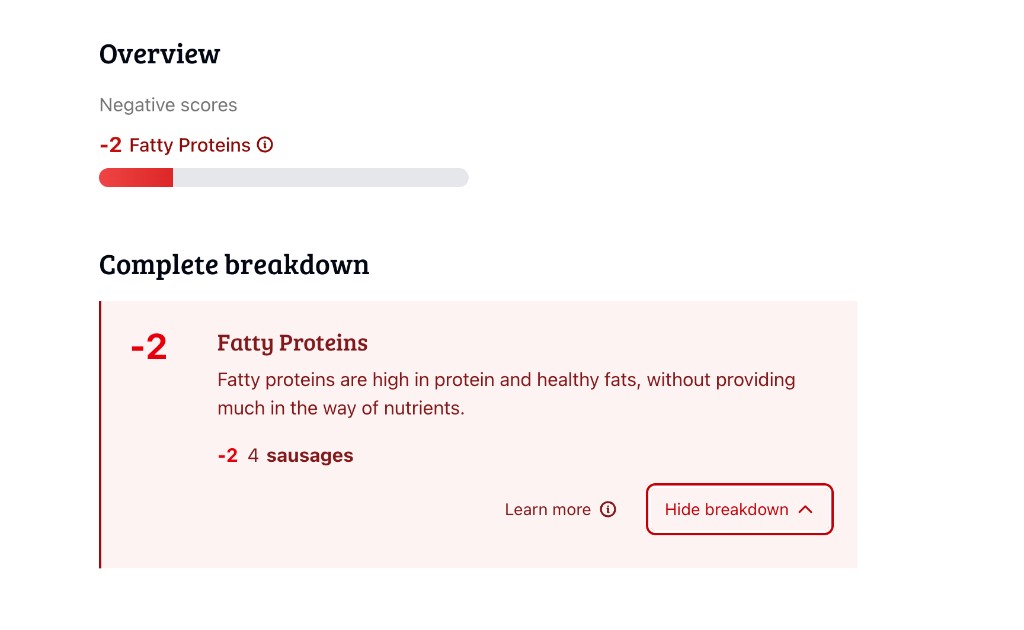
Portion-to-servings calculation example.
B) Pluralisation and singular normalisation
Problem: atypical plural variants (“berries”, pastries, “potatoes”)
could fail matching and lead to unknown categories.
Approach: normalise foods to singular using:
-
An irregular exception map (
berry → berries,potato → potatoes, etc.). -
Fallback rule: strip trailing
s.
Singular normalisation: irregular plural overrides + trailing s fallback.
// expediate-api/src/categoriser/foods.map.ts
const pluralOverrides: Record<string, string> = {
  berry: "berries",
  cherry: "cherries",
  pastry: "pastries",
  candy: "candies",
  potato: "potatoes",
  // ...
};

export const singularise = (food: string): string => {
  for (const [singular, plural] of Object.entries(pluralOverrides)) {
    if (food === plural) return singular;
  }

  if (food.endsWith("s")) {
    return food.slice(0, -1);
  }

  return food;
};
The categoriser applies singularise() before matching against
FoodCategoryMap:
Categoriser loop: singularise input then find a matching entry in FoodCategoryMap.
// expediate-api/src/categoriser/categoriser.service.ts
const FoodCategoriser = (food: string): FoodCategory => {
  for (const [category, foods] of Object.entries(FoodCategoryMap)) {
    food = singularise(food);
    if (foods.includes(food)) {
      return category as FoodCategory;
    }
  }
  return "unknown";
};
C) Handling adjectives gracefully
Problem: adjective handling ("wholemeal", "wild", "refined/regular", etc.) had to be correct without turning the categoriser into fragile conditionals.
Because some categories have the same food, the adjective is critical as
it determines whether the food gives a positive or negative score. For
example: white rice is a refined grain, where as brown rice is a whole grain.
Approach: build token lists and generate combinations:
Domain vocabulary: supported grains and adjective tokens used to generate category match phrases.
// expediate-api/src/categoriser/foods.map.ts
export const Grains = [
  "wheat",
  "barley",
  "rice",
  "pasta",
  "noodle",
  "toast",
  // ...
];

export const WholeAdjectives = [
  "whole",
  "wholemeal",
  "whole grain",
  "wild",
  "stone ground",
  // ...
];

export const RefinedAdjectives = [
  "refined",
  "white",
  "regular",
  "instant",
  // ...
];
Then category lists include dynamically generated combinations:
Category token expansion: generate all "adjective/grain"
variants for whole-grains and refined-grains.
// expediate-api/src/categoriser/foods.map.ts
"whole-grains": [
  "oat",
  "quinoa",
  "millet",
  // ...
  ...Grains.map((grain) =>
    WholeAdjectives.map((adjective) => `${adjective} ${grain}`),
  ).flat(),
],

"refined-grains": [
  "all-purpose flour",
  ...Grains,
  ...Grains.map((grain) =>
    RefinedAdjectives.map((adjective) => `${adjective} ${grain}`),
  ).flat(),
],
The same approach has been used for other categories, such as fried foods and proteins.
Screenshot suggestion: show wholemeal fusilli → whole-grains and white rice → refined-grains.
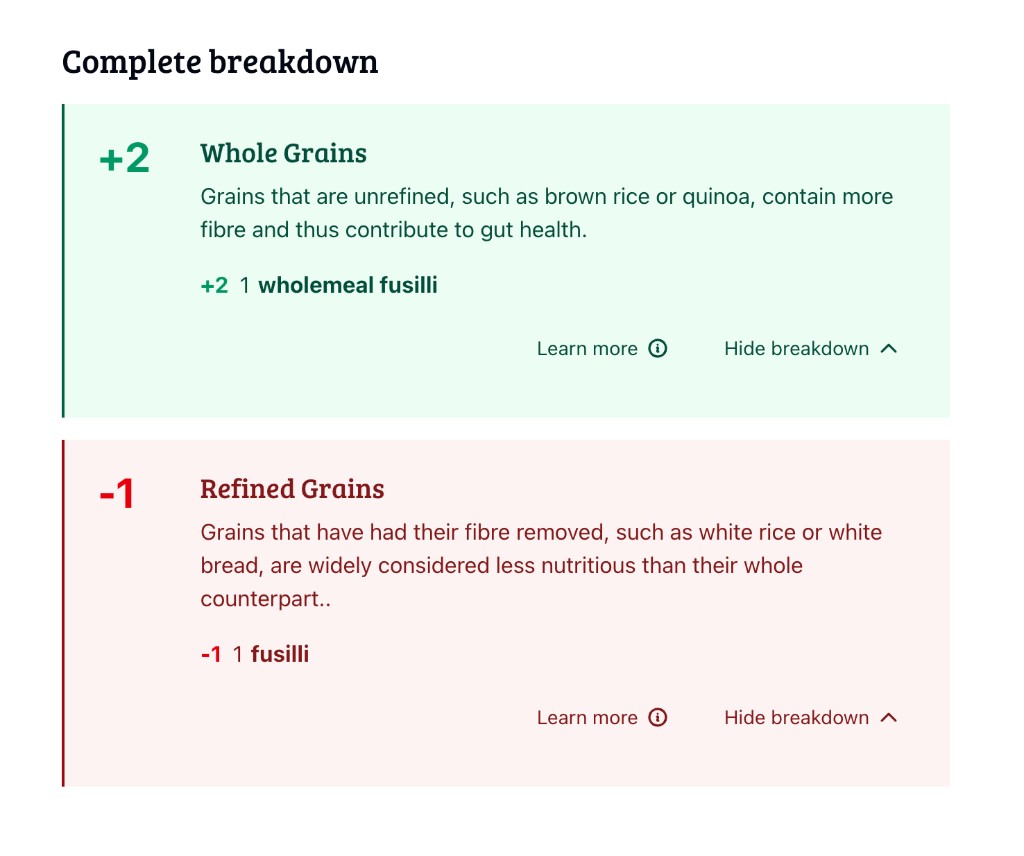
Adjective-sensitive grain categorisation example.
Transforming the data consistently
To keep the scoring reliable, the transformer normalises input:
-
Strips filler words and characters:
of,a,an,the,-. -
Parses objective units from patterns like
100g. -
Parses subjective units (e.g.,
portion,piece). - Lowercases and normalises food text by removing non-alphanumeric characters.
TransformerService.parse(): remove filler words, extract
quantity/unit, then normalise the remaining food string.
// expediate-api/src/transformer/transformer.service.ts
const FillerWords = ["of", "a", "an", "the", ...];

export class TransformerService {
  parse = (log: string): TransformedLog => {
    let parts = this.stripFillerWords(log).trim().toLowerCase().split(" ");
    let index = 0;

    let { quantity, unit, unitType } = this.getQuantityAndUnit(parts[0], parts[1]);

    if (!quantity) {
      if (unitType == "subjective") index = 1;
      else index = 0;
      quantity = 1;
    } else {
      if (unitType === "subjective") index = 2;
      else index = 1;
    }

    let food: string = "";
    for (let j = index; j < parts.length; j++) {
      food += `${parts[j]} `;
    }

    return {
      quantity,
      unit,
      unitType,
      food: food
        .trim()
        .replace(/[^a-zA-Z0-9 ]+/g, " ")
        .replace(/\s+/g, " "),
    };
  };

  stripFillerWords = (log: string) =>
    log
      .split(" ")
      .filter((word) => !FillerWords.includes(word.toLowerCase()))
      .join(" ");
}
Screenshot suggestion: show raw log → parsed { food, quantity, unit, unitType }.
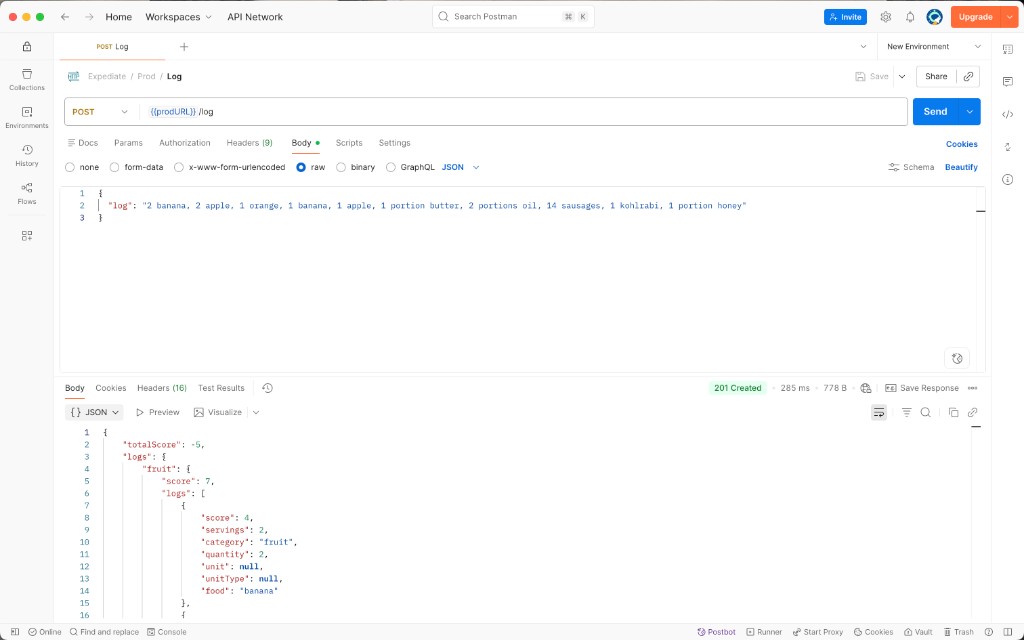
Raw input log and parsed output example.
Scoring accurately
Scoring uses a category-specific matrix (CategoryScores) and
accumulates score per item based on how many servings have already been
recorded for that category.
Point matrix (CategoryScores): points by serving count per
category.
// expediate-api/src/scorer/scores.ts
export const CategoryScores: Record<FoodCategory, number[]> = {
  fruit: [2, 2, 2, 1, 0, 0],
  vegetables: [2, 2, 2, 1, 0, 0],
  "whole-grains": [2, 2, 1, 0, 0, -1],
  refined-grains: [-1, -1, -2, -2, -2, -2],
  sweets: [-2, -2, -2, -2, -2, -2],
  "fatty-proteins": [-1, -1, -2, -2, -2, -2],
  unknown: [0],
};
Score accumulation (serving-by-serving): index into the matrix using a capped serving count.
// expediate-api/src/scorer/scorer.service.ts
for (let i = 0; i < servings; i++) {
  const count =
    categoryLogs[category].logs.reduce(
      (accumulator, { servings }) => (accumulator += servings),
      0,
    ) + i;

  score += scoreArray[Math.min(count, scoreArray.length - 1)];
}
Testing strategy
Unit tests cover the transformer (filler words, objective vs subjective units), categoriser (whole vs refined grains, plural/singular), and scorer (matrix + serving rounding).
Examples:
Transformer tests:
// expediate-api/src/transformer/transformer.service.spec.ts
it("should strip out filler words if provided", () => {
  const log = "1 portion of white bread";
  const { unit, food, quantity } = service.parse(log);
  expect(food).toBe("white bread");
  expect(unit).toBe("portion");
  expect(quantity).toBe(1);
});

it("should give me an objective type based on the unit provided", () => {
  const log = "100g oats";
  const { unit, unitType, quantity } = service.parse(log);
  expect(unit).toBe("g");
  expect(unitType).toBe("objective");
  expect(quantity).toBe(100);
});
Categoriser tests (plural/singular and grain adjectives):
// expediate-api/src/categoriser/categoriser.service.spec.ts
it("should categorise both plural and singular foods", () => {
  const categories = [
    service.categorise("berry"),
    service.categorise("berries"),
    service.categorise("noodle"),
    service.categorise("noodles"),
    service.categorise("potato"),
    service.categorise("potatoes"),
  ];

  categories.forEach((category) => {
    expect(category).not.toBe("unknown");
  });
});
End-to-end(-ish) scoring through LogService:
// expediate-api/src/log/log.service.spec.ts
it("should correctly score my breakfast", () => {
  const payload = {
    log: "oats, tahini, peanut butter, 1 banana, 1 portion milk, 15g honey",
  };

  const { totalScore, logs } = service.create(payload);
  expect(totalScore).toBe(7);
  expect(logs["whole-grains"].score).toBe(2);
  expect(logs["nuts-seeds"].score).toBe(4);
});
Screenshot suggestion: Jest output/coverage.
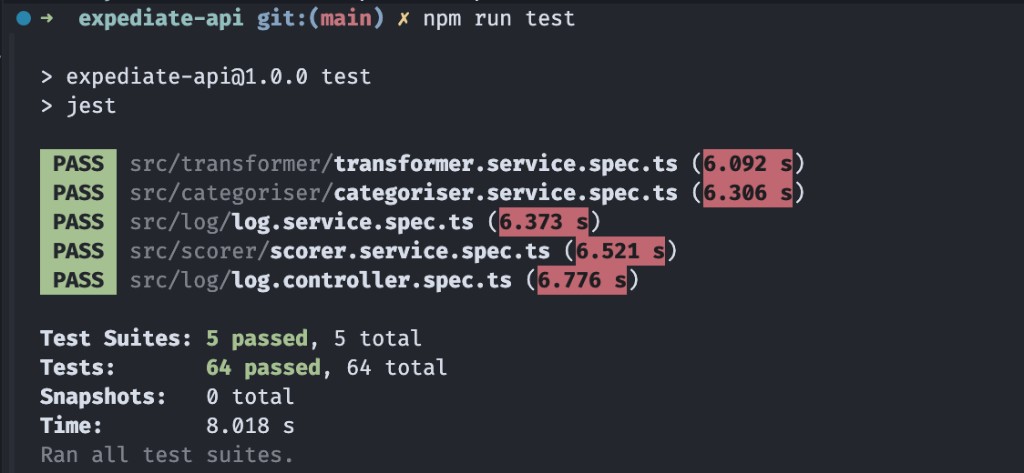
Jest test output and suite pass summary.
UI build
The web app is a thin Next.js on top of the API:
- Users paste a comma-separated food log into a single text field.
-
The app sends the raw log string to the API and receives
totalScoreplus a per-category breakdown (logskeyed by category slug). - The UI presents the DQS and groups logs by category so users can see which categories contributed to the DQS.

UI: food log input screen.
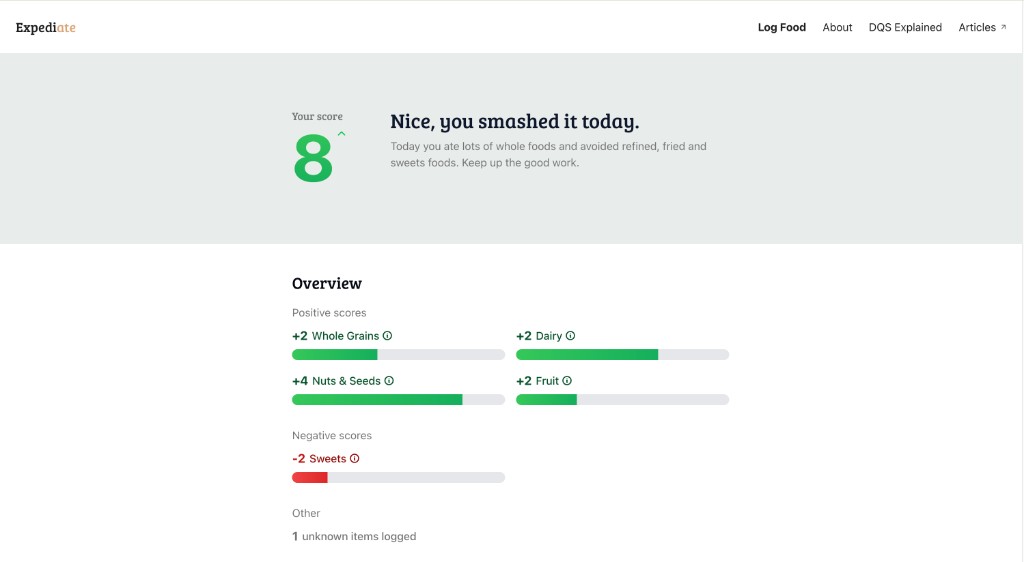
UI: DQS result with per-category breakdown.
Project management
I used Todoist to manage the iteration loop:
- MVP first: validate the end-to-end “text input → parsed items → DQS output” path.
- Turn each observed failure mode (portion conversions, plural/singular matching, grain adjective handling) into a focused task and make it testable.
- Keep pipeline changes small so each iteration could be validated quickly.
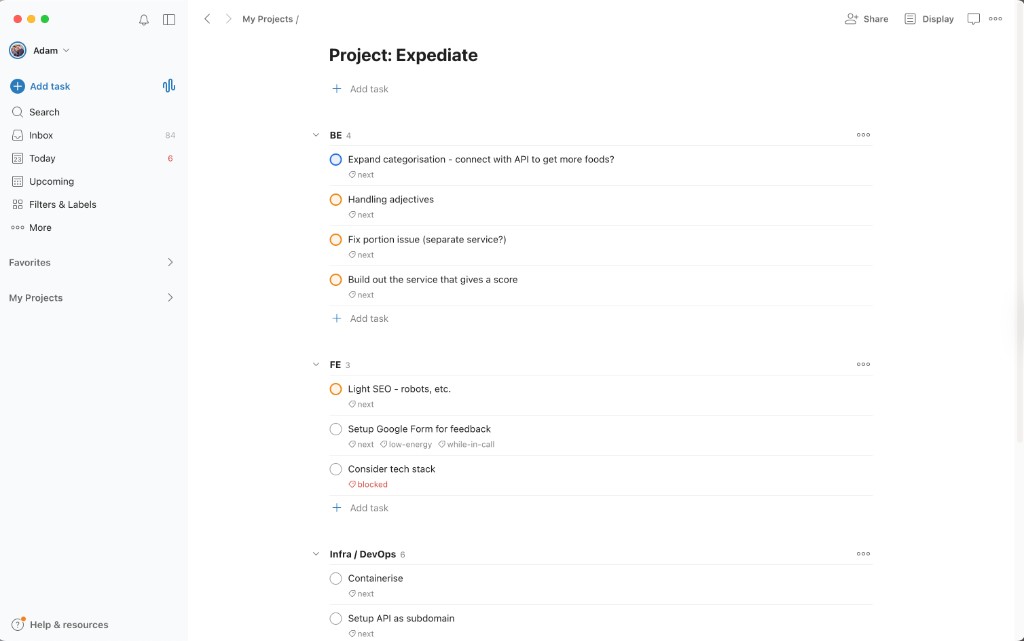
Todoist board from MVP to parsing and categorisation iterations.
Outcome
- Delivered a proof-of-concept end-to-end pipeline: users paste a natural-language log and get a deterministic DQS with an item-level breakdown.
- Separated transformer, categoriser, and scoring responsibilities (via interfaces), so future scoring approaches can be added without rewriting normalisation and categorisation.
Future considerations
- Implement user accounts in order to save logs and review DQS over time.
- Expanding foodstuff coverage and improving matching accuracy with more real athlete logs.
- Integrate with other scoring systems, such as NOVA.